
What players say
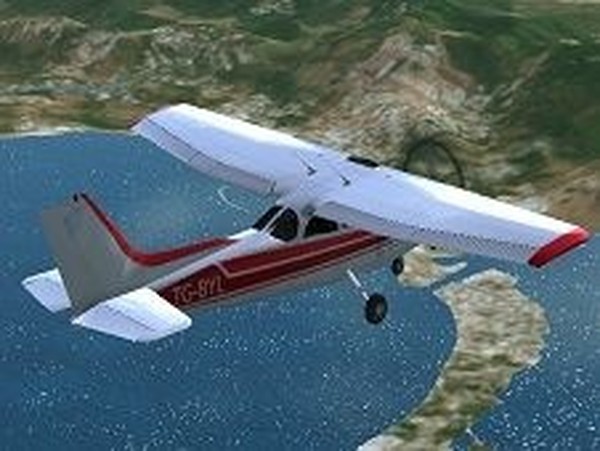
Aerial Navigator Flight Challenge stands out for its serene approach to flight simulation. The checkpoint navigation system teaches spatial awareness and throttle control without pressure. Takeoffs and landings require genuine skill, but the forgiving design allows repeated practice. The gradual progression and virtual license system provide clear goals. Optimized for touchscreens, it runs smoothly on most devices. A solid choice for anyone wanting a thoughtful, non-violent aviation experience.
About this game
Flight Path Navigation
In Aerial Navigator Flight Challenge, players guide an aircraft through a series of green markers suspended in the sky. These markers define the correct route from departure to arrival. The experience emphasizes steady control and situational awareness rather than speed or combat. Each flight presents a new set of waypoints that require careful steering and altitude management. The game rewards patience and precision over aggressive maneuvering.
Takeoff and Landing Mechanics
Starting a flight involves accelerating down a runway and lifting off at the appropriate speed. Landing requires a controlled descent and alignment with the destination runway. These phases are the most demanding parts of each flight, as they demand fine adjustments to throttle and pitch. Practicing these maneuvers helps players build muscle memory and confidence. The simulation provides a forgiving environment for learning without penalty for minor mistakes.
Progression and Virtual Licensing
Completing flights in sequence unlocks new aircraft and airports. The ultimate goal is to earn a virtual pilot license, which serves as a marker of achievement. The difficulty curve increases gradually, introducing longer routes and more complex checkpoints. This structure gives players a clear sense of advancement and purpose. The licensing system adds a layer of motivation without requiring real-world commitment.
Visual Design and Device Optimization
The game uses 3D graphics to create an immersive sky environment with clear landmarks and weather effects. It is optimized for touch controls on mobile phones and tablets, with responsive buttons for throttle, pitch, and yaw. The interface remains uncluttered, allowing players to focus on the flight instruments and the horizon. Performance is smooth even on older devices, ensuring broad accessibility.
Autopilot Assistance
Some versions of the game include an autopilot feature that can take over navigation once the aircraft reaches a stable altitude. This tool helps reduce workload during long straight segments, but players must remain ready to resume manual control for landing and unexpected course changes. The autopilot is a learning aid, not a replacement for skill development. It allows beginners to observe correct flight paths while still participating actively.








Player comments
Sign in to comment
You must be logged in before posting a review or rating.
No account? Create one
No comments yet. Be the first to comment!