
What players say
City Coach Driving 3D suits players who prefer deliberate, low-speed driving challenges over arcade racing. The weighty coach handling, variable weather, and traffic patterns create a steady difficulty curve. Earning new coaches adds light progression. The keyboard-only control scheme and lack of stated multiplayer may limit appeal for some, but the browser format makes it easy to attempt a single route during a break.
About this game
Route Navigation and Traffic Awareness
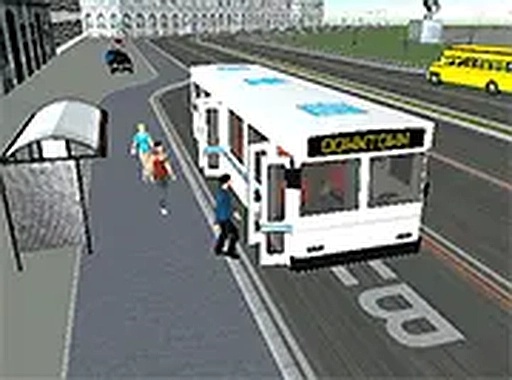
Each run in City Coach Driving 3D begins with a designated route marked by on-screen indicators. You steer a full-sized coach through intersections and lane changes, but the real test comes from other vehicles. Cars change lanes unpredictably, and trucks crawl slowly on inclines. You must merge, yield at crosswalks, and adjust speed for curves. Weather adds another variable: rain or snow reduces traction and visibility. Downtown corridors demand tight, precise steering, while open highways allow steadier pacing. The game rewards reading the road ahead rather than reacting late.
Coach Handling and Vehicle Progression
The coach carries realistic weight and momentum, so turns and stops require gentle, early inputs. Completing routes earns access to additional coaches, each with slightly different handling traits such as improved braking or better acceleration. These differences matter on challenging routes. Upgrades focus on practical improvements rather than cosmetic changes, and selecting the right coach for a specific route becomes part of the strategy. The progression system gives players a reason to repeat routes and refine their technique.
Camera Views and Control Scheme
City Coach Driving 3D offers multiple camera angles. A first-person driver's seat view helps with judging distances and mirror positions. A third-person perspective shows surrounding traffic and road layout more clearly. Controls use simple keyboard inputs for acceleration, braking, and steering. The interface keeps speed and route progress visible without cluttering the screen. Full-screen mode is supported for a more focused session.
Session Structure and Accessibility
The game runs directly in a web browser with no download or installation required. Sessions are structured as individual routes with clear start and end points. This design suits quick breaks or repeated practice on a single route. Players can set their own goals, whether completing one run or improving performance across multiple attempts.
Compatibility
FAQ
Player comments
Sign in to comment
You must be logged in before posting a review or rating.
No comments yet. Be the first to comment!







Editorial Notes